Be friend and get close to your readers. Let them be able to contact you easily. Your readers want your feedback, so do follow the comments left by your readers. If your readers are asking question, make sure you get back to them (replying their comments). People need information and that is why they go to your blog to search for answers. Be honest with your readers, try to offer help when applicable.
 Posting up your email for readers to contact you is the most basic way of letting your readers contact you besides leaving comments/feedback in your blog (comment section or chatbox widget). However, it will be much more easier if you can provide a “contact form” feature in your blog.
This will facilitates your readers to contact you just by filling the contact form.
Why Contact Form?
[1] Readers can contact you easily. [2] Ensure the message is successfully delivered to you. [3] Having a more professional feel (impression wise).Adding a contact form nowadays is not difficult at all. You don’t need to have HTML knowledge to have this done. There are free services or plugins available to help you add a contact form to your blog.
How to Add a Contact Form?
For WordPress user, you can install the Enhanced WordPress Contact Form plugin. Once you activate this plugin in your WordPress blog, you can set the configuration under the “Settings” tab (for WordPress 2.5). The settings is quite straight forward. Take a look at the sanpshot which is quite self explained below.
Then you will have to create a Page, and add in the following code and publish your page.
For more support on this plugin, click here.
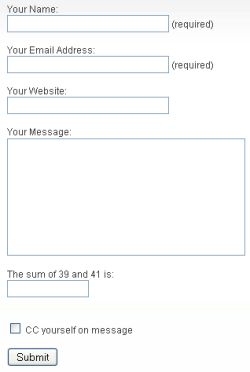
For Blogger (Blogspot) user, you can add a contact form to your blog too! No, you don’t need to code the contact form yourself. All you have to do is to sign up for a FREE account at WebFormDesigner. Follow the instructions and you can get a simple yet functional contact form like this:
I will not go into detail on how to generate a contact form like the above. Instead, you can read read this detail tutorial on adding a contact form in your Blogspot blog.
Do you have a contact form in your blog? If you haven’t, try to add one now. 
By melbie on Jun 20, 2008
Another thing that I’ve been trying to add to my blog for ages to no avail! Always comes up with error… I’ll try this later tonight..
By terry on Jul 1, 2008
it’s always good to have contact form rather than inserting our email address – just to avoid those spammers