Do you notice something like this at the end of each post? Many other blogs do have similar icons too. The colorful icons look stylish and cool, but they are not only for decorating the blog.
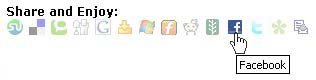
These little icons are known as “social bookmarks”. There are plenty of social bookmarking sites which you may or already are a member. Today, I’m going to talk about the Facebook bookmarking feature.
When you click on the  icon below a blog post, provided you are signed in to your Facebook account, that particular blog post link will be added to your Facebook Mini-Feed. Now, everyone in your network will be able to see your posted link. If they are interested and click on the link, you gain traffic to your blog!
Yes, of course you can click on the icon at your own blog post. Haven’t got the social bookmarking icons / buttons? Try Sociable for own hosted WordPress or AddThis for other blogging platforms. If you don’t implement such social bookmarking buttons, you will have to post the link to Facebook manually.
Adding a post link to your Facebook account with the icon is easy.
First, look for the post that you want to share with your Facebook friends and click on the icon. (I’m using my other blog as an example)
If you already login to your Facebook account, you will see something like this:
When you are done with the setting, just click on the Post button below that page. The post will then be posted to your Facebook profile. If you want to send this link to your friend instead, choose the Send a Message and follow the instruction.
Go to your profile and now you can see the post. When someone click on the post link, he/she will then be directed to the orginal blog post. Anyone can leave comment or share with others.
Easy, isn’t it? This is how you can boost some traffic to your blog. Try it out.
Oh, you can add me in Facebook too!
By curryegg on Jun 11, 2008
This is great! But… is there any way to add this in blogspot?
I really enjoyed reading the article about “Optimized” your facebook account. I have a program that I use, the name of it is Shareaholic, it is a free program to download. It has a lot of sites programed in it where you can just click a couple of times and you can share posts like this one and others right to your Facebook account, plus twitter and about 10 other sites, it does save some time and you can get a lot more done.
Meg
p.s. like the movie “Grease”
Love the music.